Custom domain
Connect the client’s domain and make the Pages URL production-ready.
A clean Fiverr-ready workflow for collecting client details, generating a polished static site, deploying it to Cloudflare Pages, and handing over the full source folder.
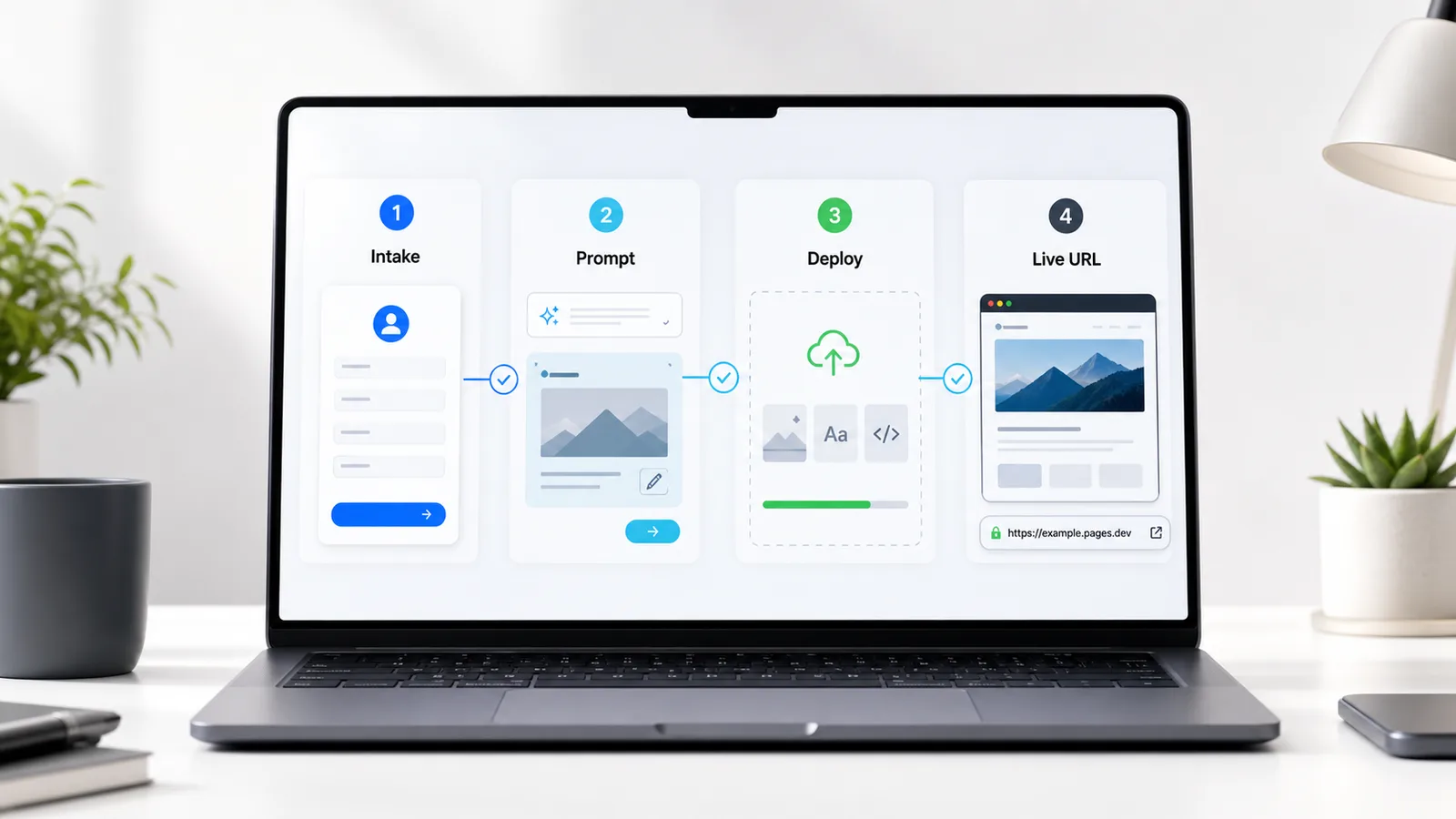
Intake: one form captures the brief.
Generate: AI drafts the static site.
Deploy: Pages returns a live URL.
Deliver: client owns every file.
The point is not to add more tools. It is to remove handoffs: collect the right inputs once, generate a clean first version, publish the folder, and send a clear delivery note.
Ask for the business name, goal, sections, colors, assets, content, contact form needs, special features, and deadline.
Paste the intake answers into the prompt and produce a responsive static site with Tailwind and vanilla JavaScript.
Upload the finished folder to Cloudflare Pages or deploy with Wrangler for an instant pages.dev URL.
Send the live URL, attach the source files, and offer useful upgrades like a custom domain or email-backed form.
A small site fails when the brief is vague. These fields force the customer to provide the content and decisions that actually change the finished page.
Paste the customer answers into this prompt. It intentionally asks for a static, fast, mobile-first site so the output remains easy to deploy and easy to hand off.
website-prompt.txt
Create a complete single-page modern website using HTML, Tailwind CSS (via CDN), and vanilla JavaScript.

Website name: [insert name]
Goal: [insert goal]
Sections needed: [list sections]
Color scheme: [insert colors]
Content: [paste any text they gave]
Features needed: [contact form, etc.]

Requirements:
- Fully responsive
- Clean, professional, modern design
- Use Tailwind classes
- Include a working contact form (use Formspree or a placeholder)
- Fast loading, no heavy dependencies
- One single index.html file + optional style.css and script.js
- SEO-friendly (proper meta tags, headings)
- Mobile-first

Return the complete code in separate blocks:
index.html, style.css (if needed), script.js (if needed).The only deployable output is the website folder. That keeps the client handoff clean and avoids leaking your internal template, prompt notes, or working files.
terminal
cd fivrr-example
npx wrangler pages deploy website --project-name fivrr-example
Dashboard upload works too: Create project, choose Upload assets, and drag in the
website/ folder.
Hi [Name],
Your new website is ready.
Live URL: https://your-customer.pages.dev
I’ve also attached the full source files so you own everything.
Would you like me to connect a custom domain, make any changes, or set up a contact form that actually emails you?
Let me know.
Keep the base package simple, then offer the work that has clear value once the customer sees the live site.
Connect the client’s domain and make the Pages URL production-ready.
Wire the contact form to Formspree or another lightweight form provider.
Polish copy, layout, imagery, and mobile details after the first review.
Connect the intake form to notifications and a repeatable project folder workflow.
website/ folder only. Keep
prompt notes, internal templates, and working docs separate.
Send the business name, goal, required sections, assets, and deadline. The response opens as an email so the static site stays simple.
Email: hello@example.com
Handoff: live URL plus source folder.